You're offline — changes are saved and will sync when you reconnect.
Trade contractors · Commercial projects · Field service
AllQuote
From estimate to delivery. Keep every job connected.
Quote work, schedule people and equipment, keep field activity and costs on the job, then invoice and review the result in one connected system. For trade contractors, commercial contractors and field-service teams, from service visits to commercial projects. Tools and limits vary by plan.
AllQuote gives the office, supervisors, stores and allocated field crews one operational record, with plan gates and role permissions deciding who can use each tool.
Flexiblefor trade contractors, maintenance teams and other site-based service businesses
1connected record from first enquiry to reconciled invoice
AUGST settings, licence records and configurable compliance workflows
Fieldnative mobile tools for quoting, photos, stock, time and dispatch
WELCOME50
Half price for your first 6 months on Team or Business
Team A$74.50/month for the first 6 months, then A$149 a month
Business A$174.50/month for the first 6 months, then A$349 a month
New monthly Team or Business subscriptions, once per account. Prices include any applicable GST/VAT. Any tax charged is shown before payment. Conditions apply. See the offer
Offer terms
Once per account, across all its businesses. Available to accounts taking their first Team or Business subscription, including upgrades from Free, Starter or Crew. Existing or previous Team, Business and Enterprise subscribers cannot redeem, including downgrades. Cancellation and rejoining do not reset eligibility. Monthly AUD Core plans only. Prices include any applicable GST/VAT. Any tax charged is shown before payment. Starter, Crew, Takeoff, custom Enterprise agreements, annual plans, add-ons and usage are excluded. Cannot be combined with another discount. After 6 months, the standard monthly price applies automatically unless you cancel. For upgrades, Stripe shows any prorated charge or credit before you confirm.
Create a free account or sign in, then open Billing → WELCOME50 and choose a plan. The code is applied before you confirm payment in Stripe.
On the phone
What your customers and crew actually see.
Two moments that decide how a call-out feels: the customer waiting for you to arrive, and the urgent job that needs someone now.
On the way
Arrived
I'm on my way
Let customers watch you arrive.
One tap gives your customer a private link with your live position and an estimated arrival time that refreshes every 15 seconds. No app, no login.
Your business name on the page, not a generic tracker.
Sharing stops when you arrive, and the link expires.
Keep the work package and the commercial record connected.
Estimate from plans, coordinate crew visits, record field progress and review variations and costs. AllQuote also provides plan-dependent progress-claim and retention tools for staged work.
Send an urgent job offer to selected or nearby available crew. The first eligible acceptance fills an open slot and assigns that worker to the job; the offer closes when its slots are filled. Check opted-in location freshness and availability before choosing recipients.
An unanswered ping is not an assignment. If nobody accepts, review recipients or assign manually. Eligible unpriced, unbilled emergency jobs can use do-and-charge; existing priced or billed jobs retain their billing.
Create reusable templates, link forms to jobs or tasks, and collect the required sign-off. Set a required SWMS record to become due once per job, task or work day, or leave it elective. Team shows due records; Business and Enterprise offer configurable warning or blocking rules.
Templates and signed records support your work process; they do not replace a site-specific risk assessment or certify legal compliance.
The whole job lifecycle, not another disconnected tool.
AllQuote keeps every step connected so pricing, scheduling, compliance, stock, time, invoices, accounting and reporting all refer to the same job record.
01
Capture scope
Keep notes, photos, plans, assets, site details and customer history with the work.
02
Quote and accept
Send branded PDFs or live links with configurable taxes, options, deposits and customer acceptance.
03
Schedule and dispatch
Assign crew, check availability and use routing, location or ETA tools where enabled.
Invoice, collect payment, sync accounts, reconcile and review actual job margin.
QuoteReady
Switchboard upgradeScope, labour and materials
$4,280
PlannerTuesday
8:00am - 1:30pm
Job activityLive
Quote accepted9:12
Crew assigned9:18
Deposit received9:24
On-screen takeoffs
From plan to priced work. Every quantity accounted for.
Measure the drawing, build up the materials and review the numbers in one workspace. Carry the quantities into a quote or job, or export them for the next step.
Manual takeoff is included with Takeoff, Business and Enterprise. Team feature settings and permissions apply. Editing requires quote-creation permission; field roles do not have the web editor. Quantity downloads require export permission. Creating a job also requires job access and an available place within your plan's monthly job limit. Compare plans.
Measured on a real plan set.
Source sheets · calibrated at 1:100
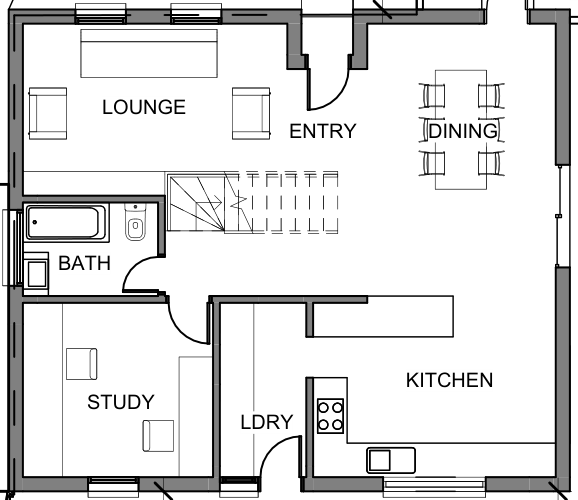
Scene 01Area takeoffMeasure the open-plan floor, then review the boundary before keeping the area.
Area · reviewed45.08 m²
Area Open-plan floor
1:100 source drawing · stair and fixed cabinetry excluded.
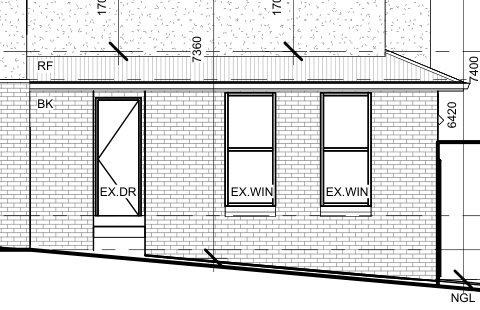
Scene 02Manual selection + deductionsTrace the brick face, then knock both window openings out of the measured area.
Wall Brick elevation
gross 16.12 m² - 3.88 m² openings = 12.24 m²
Scene 03Smart TubingThree straight runs on a 1 m demonstration grid; the fittings and lengths fill in from the Smart Tubing rules as you draw.
1 m grid
PipeCold water20 mm copper, 6 m lengths
Length0.00 m7.80 m · 2 lengths11.00 m · 3 lengths14.00 m · 4 lengths
Coupling1
End cap2
90 deg elbow1
45 deg elbow1
Connected service operations
Choose the operating tools your team needs.
Use the plan comparison to see which quoting, crew planning, compliance, inventory, supplier, accounting and reporting tools are available at each tier.
Move from plan measurements to reviewed quote rows.
With Takeoff, Business or Enterprise, calibrate a PDF or image, measure areas, lengths and counts, then map approved ledger rows to price-book items.
Dynamic Quotes
Give customers a clearer choice without rebuilding the quote.
Configure single- or multi-choice sections for customer-facing tiers and add-ons; accepted selections lock into the quote.
Scheduling & dispatch
See the day, the work and the available crew together.
Calendar, Planner and Day Board allocations sit alongside opted-in crew-map location freshness for authorised staff.
Field app
Keep the office and field on the same job record.
The companion app lets allocated Field users capture time, photos, forms, receipts and stock, subject to role, device and connectivity.
Compliance
Put required site paperwork into the job flow.
Eligible plans support pre-starts, SWMS/JSA, forms and signed records; AllQuote remains a workflow tool, not safety or legal advice.
Money
Carry completed work through claims, invoices and collection.
Manage invoices, progress claims and retentions; Tap to Pay requires a supported Android device, provider setup and an eligible plan.
Accounting sync
Connect operational records to the accounts you authorise.
Xero, QuickBooks and MYOB connection paths depend on provider setup, permissions and the supported sync scope.
Business intelligence (BI)
Turn recorded job activity into a clearer operating view.
Configurable dashboards and report presets cover jobs, labour, money, stock and WIP for authorised users.
Monthly job volume by plan
Plans differ by job volume, included users, usage allowances and available tools.
50 jobs/moStarter
150 jobs/moCrew
500 jobs/moTeam
Everything the platform does, grouped by area
These are minimum plan gates, grouped by the first tier that includes each shipped tool. See pricing for exact limits and conditions.
Free features
Quotes, invoices and price book with GST
Manual jobs, scheduling and costing
Calendar and iCal sync
Branded PDF quotes and invoices
Tap to Pay on Android - accept cards on your phone, no reader
In-app helper and guided tours
CSV and ServiceM8 import
Jobs / month
SMS included / month
Usage Pack top-ups
Office Users
Field Users
Manual quotes, invoices, price book and GST
Guided page tours and in-app help
Calendar month/week/day and iCal sync
Supplier price files - CSV import and email-in
Quote and invoice themes
Tax inclusive or exclusive pricing
Show labour as one line
Assembly breakdown toggle
Reusable assemblies and kits
Contacts
Quote to paid job lifecycle
Schedule, work, and completion status
Cost + Margin for no-quote jobs
Deposits
Progress payments
Invoices and payment collection
Customer SMS - text messages to customers
Phone and calling - click-to-call and SMS
To-do dependencies
Variations on a job
Locations hub
Starter features
Email quotes and invoices to customers
Service agreements and recurring invoices
Document vault
Customer reviews and reputation requests
Online bookings
Enquiries
Team members and charge-out rates
Roles and permissions
Feature toggles
Crew features
GPS timesheet suggestions and discrepancies
Arrival, leave and timer safety settings
In-app team and customer messaging
Team features
Receipt & invoice scanning
ETA and on-my-way tracking
Forms, certificates, SWMS, JSA, and checklists
Accounting integrations
Progress claims
Retentions linked to jobs
Asset maintenance - equipment service loop
Equipment allocation
Add stock from the Pricebook tab
Add manual stock and edit existing items
CSV stock import and export
Prefer in-stock items on quotes
Business Planner
Day Board
Trade-aware auto-assign and route optimisation
Crews (scheduling groups)
Natural-language availability
Emergency dispatch and pings
Crew status
Opt-in live location
Business dashboard
Open API and webhooks
Supplier integrations
Contractor portal
Business features
Plan takeoff
Statutory compliance register
Worker certifications and licences
Licence approvals
Internal forms and policies
Opt-in compliance gating rules
Task trade and licence gating
Accounting job costing
Accounting reconciliation
Supplier bill accounting and job costing
Cost centres
Pay runs
Site and customer assets
QR asset tags and self-print labels
Sites and properties
Asset maintenance schedules and lifecycle
Barcode scanning
Printable barcode labels
Vehicles, warehouses and job-site locations
Restock and auto-replenish lists
Stocktake count sessions
Crew capacity
Custom report builder
Scheduled report delivery
Compliance, stock and money under control
Stop finding problems after the job is already done.
AllQuote links operational controls to the work itself, so the scheduler, crew, warehouse, office and bookkeeper are not relying on separate spreadsheets or late-night memory.
Compliance and scheduling
Eligible plans can use worker licences, certifications, configured form requirements and expiry dates as job controls.
Calendar, Planner and dispatch views keep allocations visible to authorised staff.
SWMS, JSA, checklists, custom forms and certificate templates.
Audit packs and completion gates for higher-risk work.
Asset history, recurring maintenance and service records.
Stock, barcodes and Reece ordering
Eligible plans can connect quoted, bought, used, billed and reconciled records.
Barcode stock across configured vans and warehouses, with job usage recorded separately.
Reorder tools, purchase orders and supplier bills; Reece needs a connected account.
Connection paths for Xero, QuickBooks and MYOB, subject to provider setup and permissions.
Tax settings, job costing and reconciliation workflows; professional advice remains your responsibility.
Mobile crews and dispatch
The office sees the day. The crew sees the next action.
Web and mobile tools can keep allocated work, schedule changes, notes, photos, time and stock activity connected. Access depends on the user's plan, Office or Field role, device permissions and connectivity.
Opt-in crew mapEligible Office users can review opted-in location, accuracy and freshness before choosing a worker.
Job PingAn eligible acceptance of an emergency job offer fills an open slot and assigns the worker. An unanswered ping does not assign anyone.
Field capturePhotos, receipts, forms, asset history, stock scans and time entries attach straight to the job.
In the field
See the day's jobs, routes and the next stop
Snap photos and receipts straight onto the job
Scan stock on and off the van
Use optional location-aware time suggestions or configured auto clock
Complete pre-starts, forms and checklists
Use supported field payment actions when the provider and device are eligible
Why AllQuote
Work management built around the service job.
AllQuote is not just CRM, scheduling or accounting glue. It keeps the operational record behind each customer visit connected from scope through delivery and payment.
Australian business workflows
Keep customer, site, crew and commercial records together. Set your business country and review the currency, tax settings and connected services that apply to your work.
Connected records
Quotes, jobs, schedules, stock use, invoices and recorded costs can stay linked instead of being re-entered across separate tools.
Made for service teams
Plan and role controls support solo operators, office users and allocated field crews without giving every user the same access.
Controls you configure
Licence, stock, accounting and margin checks depend on the plan, business settings, permissions and connected providers you choose.
Start free, then pick the plan that fits your crew.
Review pricing in AUD, compare tiers and choose the right rollout path for your team.
Can AllQuote replace separate quoting, scheduling and stock apps?
Yes. AllQuote is built to be the one system: quoting and plan takeoffs, scheduling and dispatch, job management, stock, timesheets, invoicing and payments, on web and in the app. Pick the plan tier with the tools you need and control what each team member can access.
Can I quote without automated generation?
Yes. Build and review quotes manually using your own labour, materials, assemblies, discounts, deposits, terms and customer document settings.
Which plans support multi-location stock and barcodes?
Business and Enterprise include stock tracking across configured vans and warehouses, and using stock on a job records that job's material use. Barcode scanning still needs a supported device and camera permission.
Where do I compare plan pricing?
The public pricing page lists current tiers, included features and plan limits. See pricing.