Quoting software for trade contractors and commercial work.
Build a quote from the work you actually intend to deliver. Bring together material quantities, labour, exclusions and customer choices, then check the price before sharing it. AllQuote connects that quote to the job that follows.
For Australian trade contractors and field-service teams. Tools, limits and connected services vary by plan and provider availability. Check current availability and pricing.
Your first 6 months. Half the monthly price.
Get 50% off a new monthly Team, Business or Enterprise subscription.
Once per account, across all its businesses. Available to accounts taking their first Team, Business or Enterprise subscription, including upgrades from Free, Starter or Crew. Existing or previous Team, Business and Enterprise subscribers cannot redeem, including downgrades. Cancellation and rejoining do not reset eligibility. Monthly AUD Core plans only. Prices include any applicable GST/VAT. AllQuote currently does not charge GST/VAT. Starter, Crew, annual plans, add-ons and usage are excluded. Cannot be combined with another discount. After 6 months, the standard monthly price applies automatically unless you cancel. For upgrades, Stripe shows any prorated charge or credit before you confirm.
Create a free account or sign in, then open Billing → WELCOME50 and choose a plan. The code is applied before you confirm payment in Stripe.
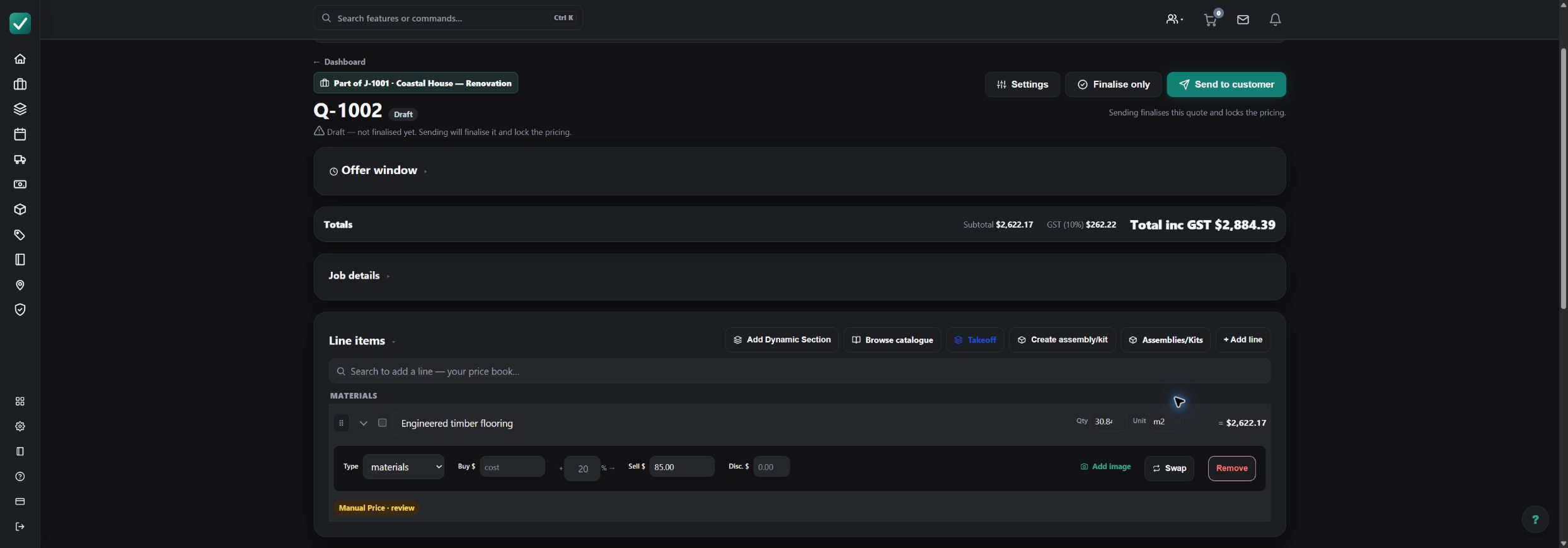
How the workflow fits together
Define the scope
Record the customer, site and work to include. Separate optional work and exclusions so the customer can see what the price covers.
Build and review the price
Add material and labour rows from your price book or reusable assemblies. Check quantities, units, selling prices, tax settings and any allowances.
Present customer choices
Use supported quote sections and options to explain alternatives. Preview the customer-facing document before finalising or sending it.
Carry acceptance into the job
Keep the accepted scope with the job record, then schedule work and follow its costs and invoices without starting a separate paper trail.
Worked example: a flooring work package
Illustrative pricing exercise, not a market rate or a customer testimonial. Enter your own rates and confirm whether they include tax.
| Item or stage | Input | Result |
|---|---|---|
| Flooring | 30 m² × $85 | $2,550 |
| Installation labour | 8 hours × $75 | $600 |
| Subtotal before tax | Materials + labour | $3,150 |
This simplified example excludes waste, preparation, travel and tax. Add those explicitly when they apply. The screenshot uses a separate measured demonstration quantity.
What to check before you commit
Own your rates
Keep frequently used items and assemblies current. A saved price still needs checking against supplier terms and the actual scope.
Explain the assumptions
Document access, preparation, exclusions and provisional quantities instead of burying uncertainty in a single total.
Review before sending
A draft is a working document. Check the customer preview, totals and options before you finalise or send it.
Questions about quoting software for trade contractors
Can I use my own prices?
Yes. Build quote lines with your own rates and use your price book or assemblies where your plan includes them. Review imported or suggested prices before sending.
Does AllQuote generate quotes with AI?
AI quote generation is not currently offered in the public plans. Create and edit quote lines using your own labour, materials and assemblies, then review the scope, quantities and prices before sending.
Can quantities come from a plan?
Yes. AllQuote takeoff can supply reviewed measured rows to a quote. Plan Takeoff is a Business-plan tool; check current pricing for availability.
What happens after the customer accepts?
Carry the accepted work into a job, then use the available scheduling, field-work and invoicing tools. Features and limits depend on the plan.
Explore the next step
Follow the create-a-quote tutorial, or open the read-only live demo with sample data.