Equipment service tracker: due and booked
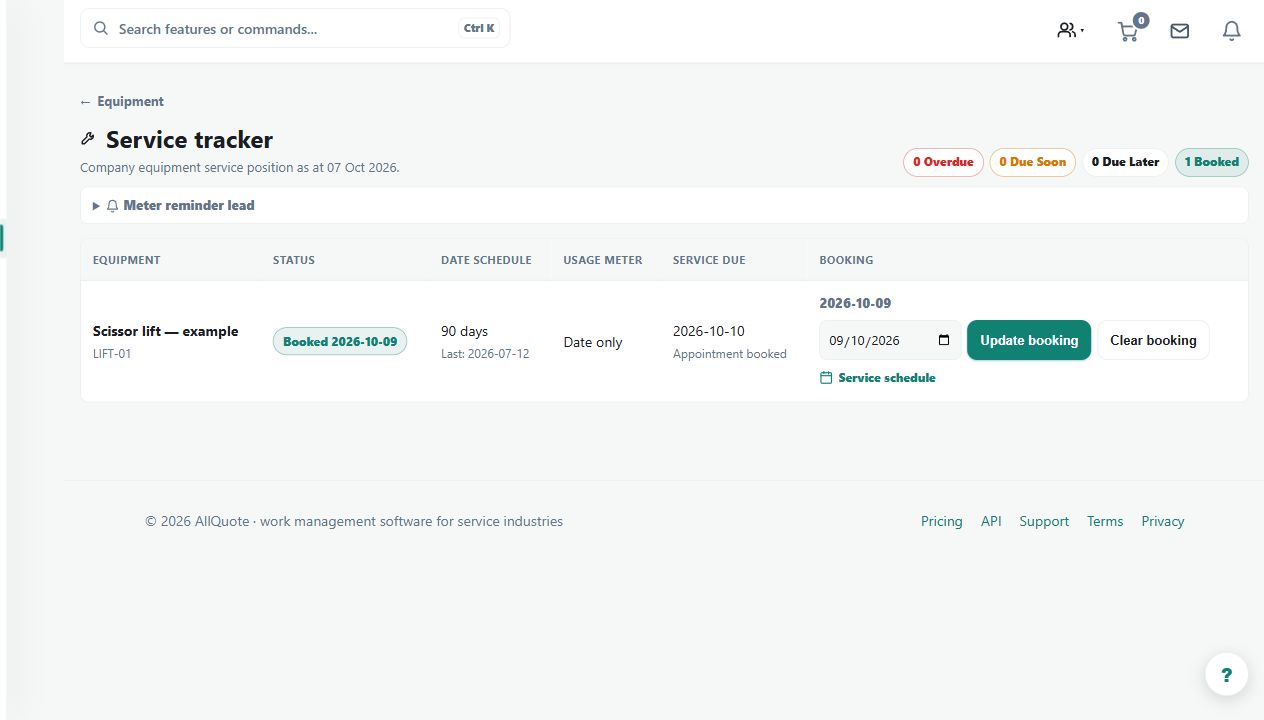
Shows when equipment service is due separately from the date a service visit has been booked.
Use the service tracker to distinguish equipment that is due or overdue from equipment with a service appointment booked.
Before you start
Availability: Team plan and above. Enabled business features, role permissions, connected providers and supported devices may add requirements.
Documented roles: Owner, Office. A role name alone does not override the permissions set by your business.
Where to find it: Work > Equipment > Service tracker.
Enter the service interval, last completed service or next due date accurately. Record a booked date only when an appointment has been arranged.
Step by step
- Open Equipment > Service tracker and review overdue, due-soon and current equipment.
- Open an equipment record and set its service interval, last service date or next due date.
- Add a booked date when the service is arranged. Booking it does not move the due date or make an overdue service complete.
- After the work is done, log the completed service so its history and next due date update from the actual service record.
Worked example
A machine is overdue but booked for Friday. Keep its overdue status visible until the service is actually completed, then log the completed work.
This is an illustrative scenario. Use your own approved scope, quantities, rates and business rules.
Check the result
Check the due date, booked date and service history separately. Confirm the next due date follows the actual completed-service record.
Limits and troubleshooting
Booking a service does not make an overdue item current or prove the work occurred. This distinction prevents a future appointment from hiding outstanding maintenance.
Check current plans and feature availability · Browse every guide